


UV printing can work on reflective sheeting—but only when the sheeting surface, UV ink and curing settings are compatible.
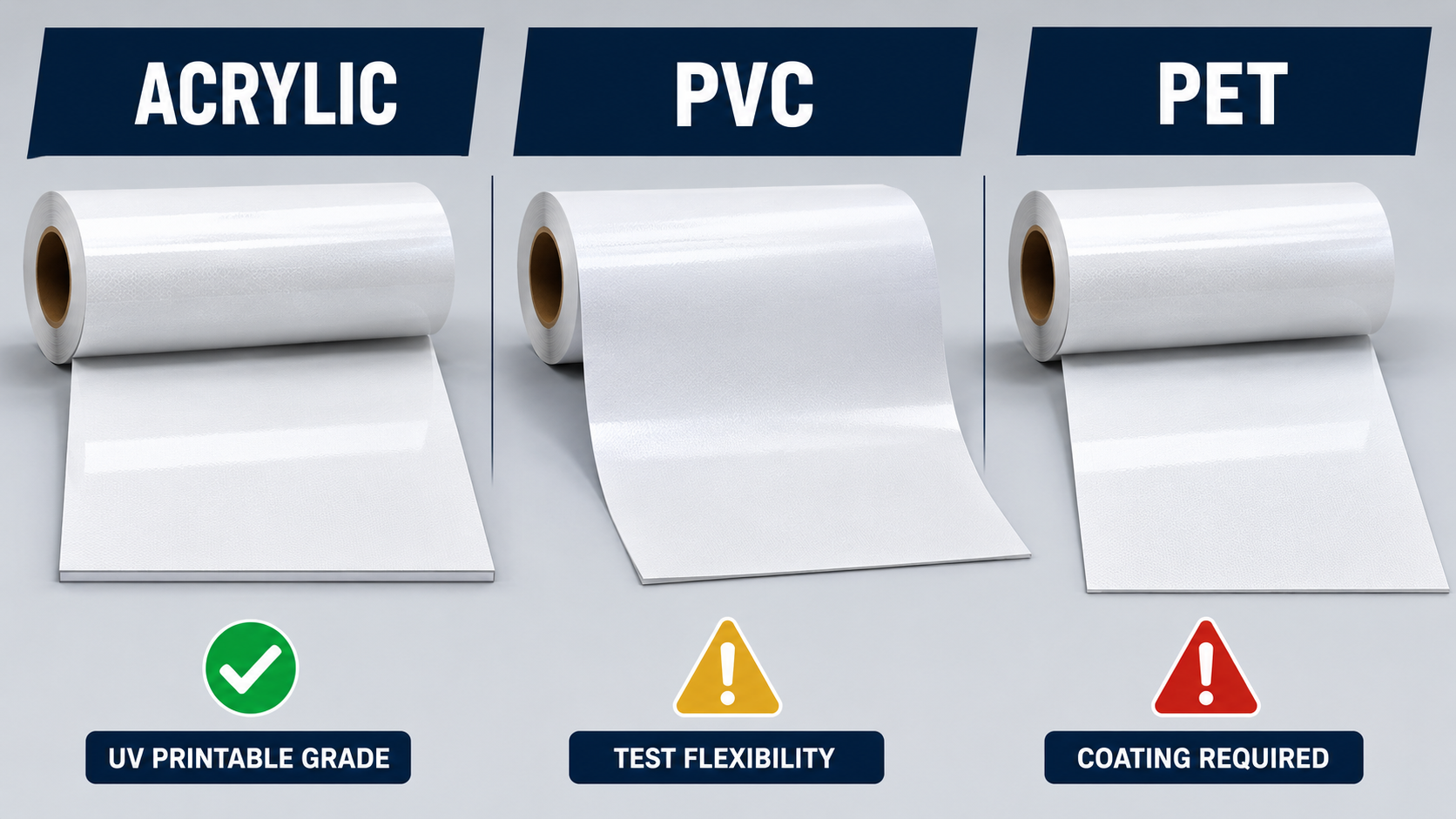
A product described simply as “reflective vinyl” is not automatically UV printable. Printable acrylic grades are usually the safest starting point. PVC, PET and microprismatic reflective sheeting require product-specific confirmation and testing.
The real question is not only, “Will the printer put ink on the film?” It is:
Will the ink wet the surface evenly?
Will it remain bonded after 24 to 72 hours?
Will it resist scratching, tape pull, bending, water and outdoor exposure?
Will the printed area retain the required nighttime visibility?
This guide explains how UV ink interacts with glass-bead and microprismatic reflective sheeting, which materials are most suitable, how to test adhesion before production and how to diagnose peeling, cracking or weak reflection.
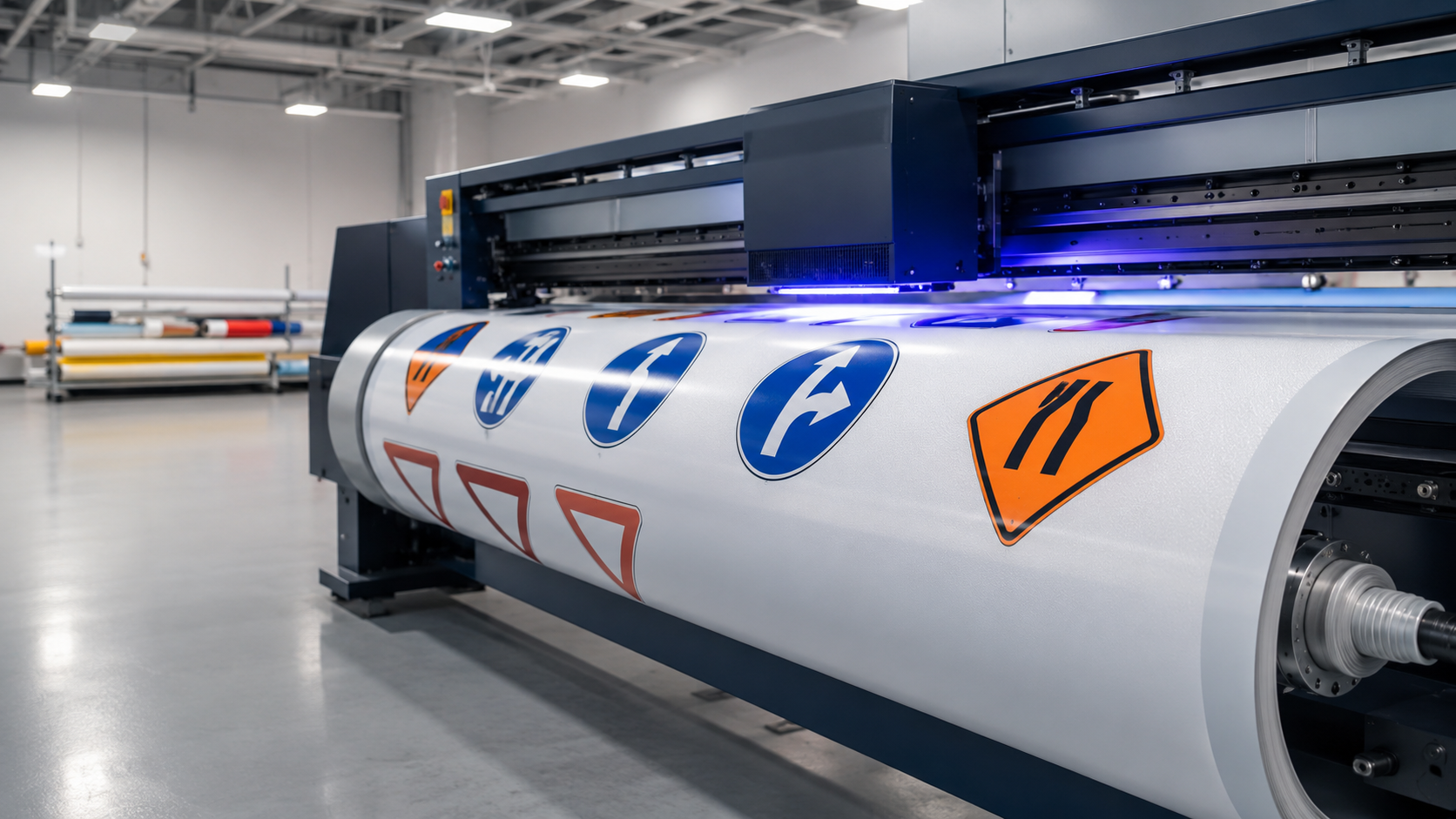
Quick Answer: Which Reflective Sheeting Materials Can Be UV Printed?
Reflective sheeting material | UV digital printing suitability | Main condition | Typical recommendation |
|---|---|---|---|
Printable acrylic/PMMA glass-bead sheeting | Generally recommended | Use a grade developed and tested for UV inkjet | Strong starting choice for flat signs, plates and customized identification products |
Standard PVC reflective vinyl | Conditional | Confirm a UV-printable top surface and use flexible ink where the film will bend | Eco-solvent or solvent printing is often more forgiving for flexible commercial graphics |
UV-printable PVC reflective vinyl | Suitable after testing | Match ink flexibility and curing energy to the product | Use for short- to medium-term signs and simple curves after bend testing |
Standard PET reflective sheeting | Often not recommended | Untreated PET surfaces may provide weak ink wetting and adhesion | Prefer plotter cutting, screen printing or another approved process unless UV compatibility is stated |
Treated or acrylic-coated PET sheeting | Conditional to suitable | Supplier must confirm the coating and intended ink system | Test for delayed peeling and heat-related distortion before production |
Engineering-grade glass-bead sheeting | Product-specific | Use only a printable version and verify the required sign specification | Best for flat panels; do not assume every engineering grade is printable |
HIP or other microprismatic sheeting | System-specific | Use an approved sheeting, ink, printer profile and overlay combination | Required for regulated or warranted traffic-sign work |
License-plate reflective sheeting | System-specific | Follow the approved license-plate printing and protection process | Generic UV inkjet approval must not be inferred from “UV screen printable” |
Important: Face-film names such as PVC, PET and acrylic describe only part of the construction. A printable coating, surface treatment, plasticizer package, weather layer and manufacturing process can make two films with the same base material behave very differently.
Why Is UV Ink Adhesion Difficult on Reflective Sheeting?
UV-curable ink does not need to penetrate deeply into a material. It is jetted onto the surface and polymerized rapidly under UV or UV-LED light.
This makes the process fast and produces sharp graphics, but it also means the bond depends heavily on the chemistry and cleanliness of the outermost layer.
Reflective sheeting is a multilayer optical material, not ordinary printable vinyl. Its upper film must:
Protect the glass beads or microprisms
Transmit incoming and reflected light
Resist rain, sunlight and environmental contamination
Maintain color and surface appearance
Protect the internal reflective structure
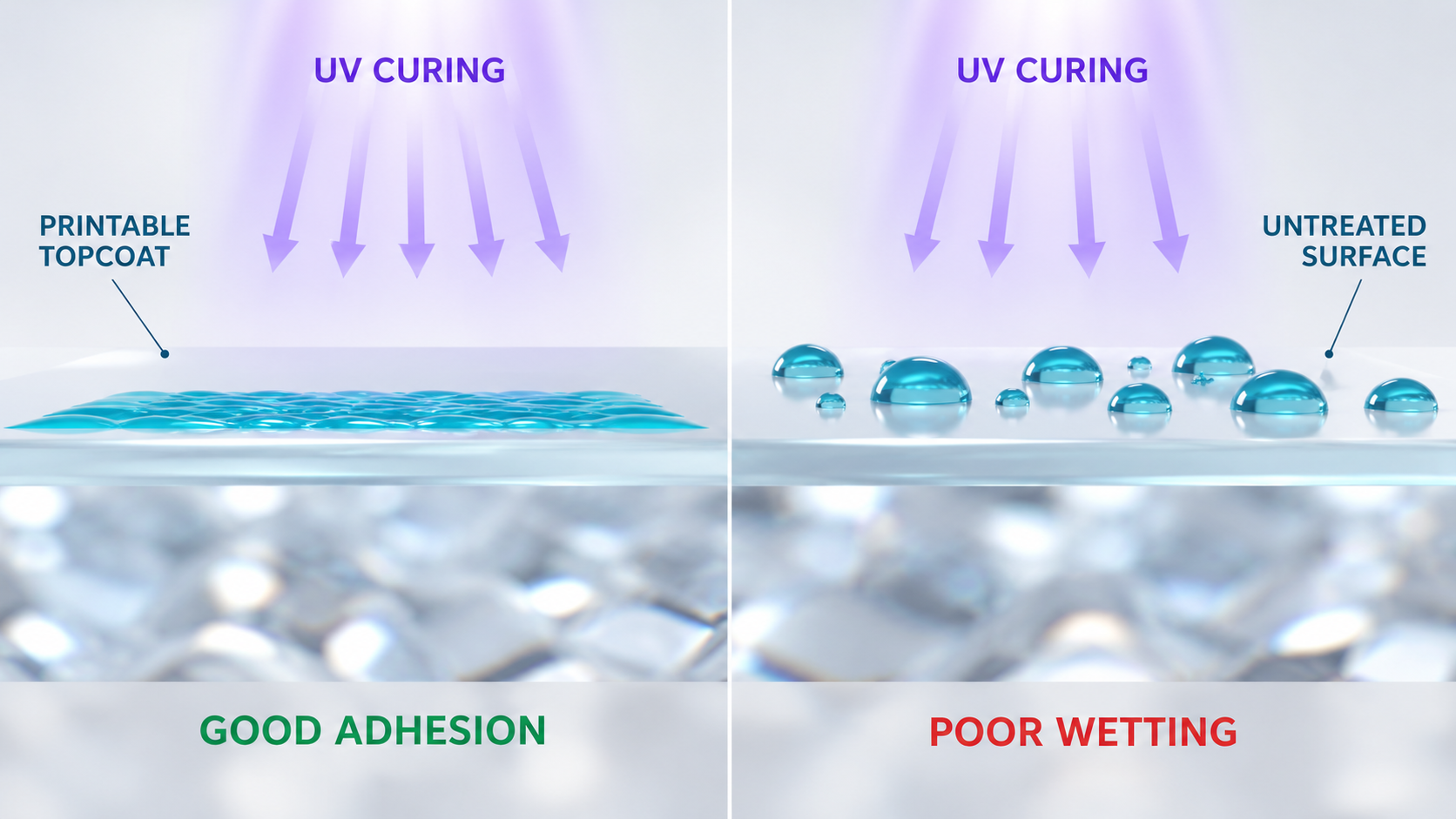
The same smooth, chemically resistant surface that protects the optical system may be difficult for some inks to wet and bond to.
3M’s digital-printing guidance identifies the composition of the top layer as a potential ink-adhesion challenge and emphasizes the importance of a tested ink-and-material combination.
This is why a successful UV printing test on standard white vinyl does not prove that the same settings will work on reflective film.
Five Factors That Control UV Ink Adhesion
1. Surface Chemistry and Surface Treatment
The exposed surface may be:
PVC
PET
Acrylic/PMMA
A weather-resistant resin
A special printable coating
A treated composite surface
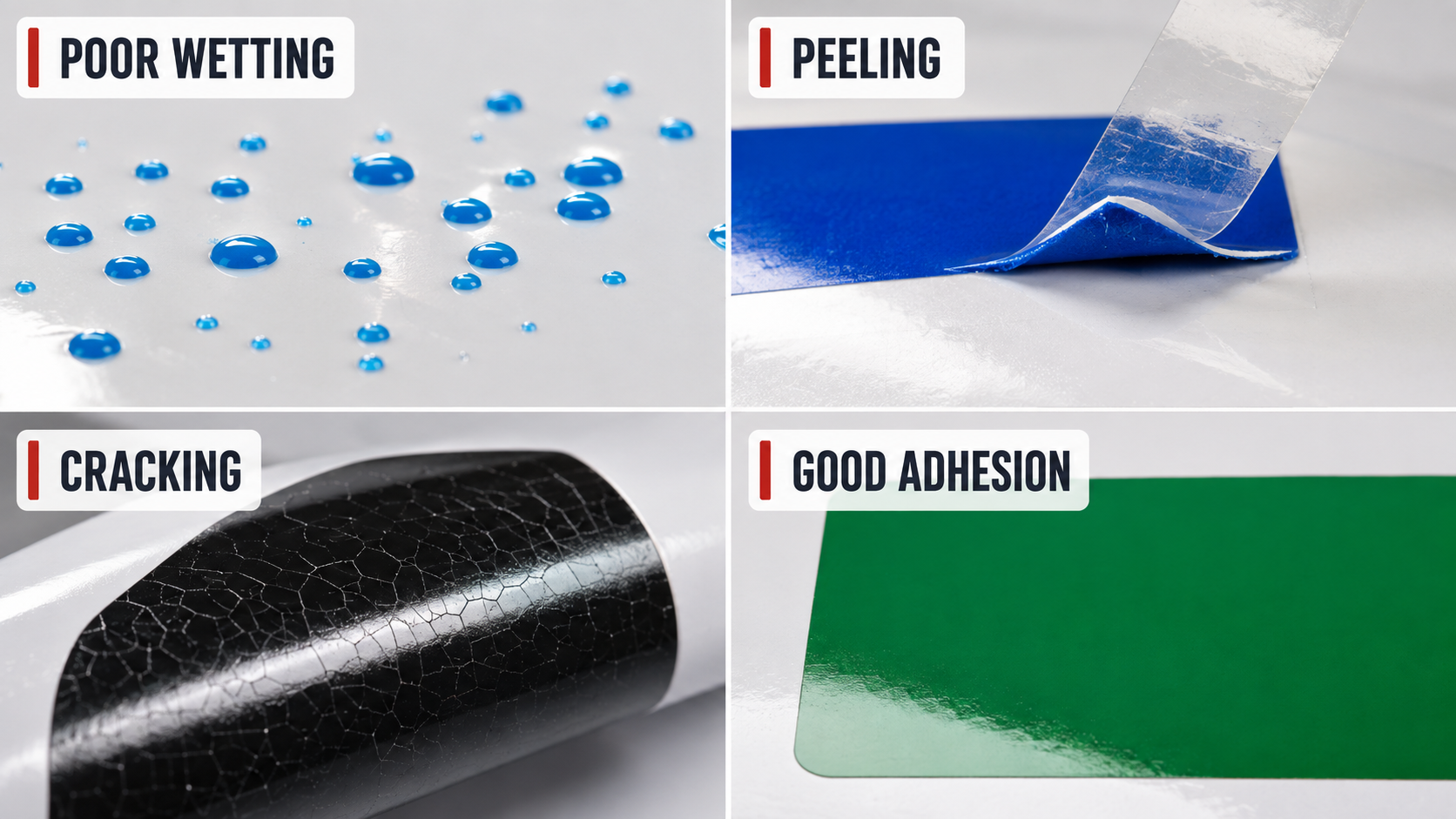
Low surface wettability can cause ink beading, pinholes, uneven color or easy peeling.
A specially coated PET reflective sheeting may therefore print better than an untreated PET product, even though both are sold as “PET reflective sheeting.”
2. Surface Contamination
Dust, fingerprints, silicone, oil, moisture, release-agent transfer and unsuitable cleaning chemicals can interrupt the ink-to-film bond.
Reflective sheeting should be stored in clean conditions and handled with clean gloves before printing.
3. Ink Hardness and Flexibility
Hard UV inks can perform well on rigid panels but crack when flexible PVC is bent.
Printer manufacturers may offer both hard and flexible UV inks for different applications. Mimaki, for example, distinguishes hard inks for plates from softer inks for films and vehicle graphics.
The ink must match the mechanical behavior of the reflective material.
4. Curing Energy and Ink-Film Thickness
Undercuring can leave a soft or weak ink film.
Excessive curing energy, heat or repeated heavy ink passes can:
Make the printed layer brittle
Distort heat-sensitive media
Reduce flexibility
Cause cracking during cutting or bending
Create poor adhesion between multiple ink layers
More UV power is not automatically better.
5. Time After Printing
Immediate scratch resistance is useful, but it is not enough.
Adhesion can change as:
The ink completes post-curing
The reflective film relaxes
Plasticizers or additives migrate toward the surface
The printed roll is rewound or placed under mechanical stress
For a new material and ink combination, adhesion should be checked immediately and then repeated after 24 and 72 hours.
UV Digital Inkjet Is Not the Same as UV Screen Printing
This distinction prevents one of the most common specification mistakes.
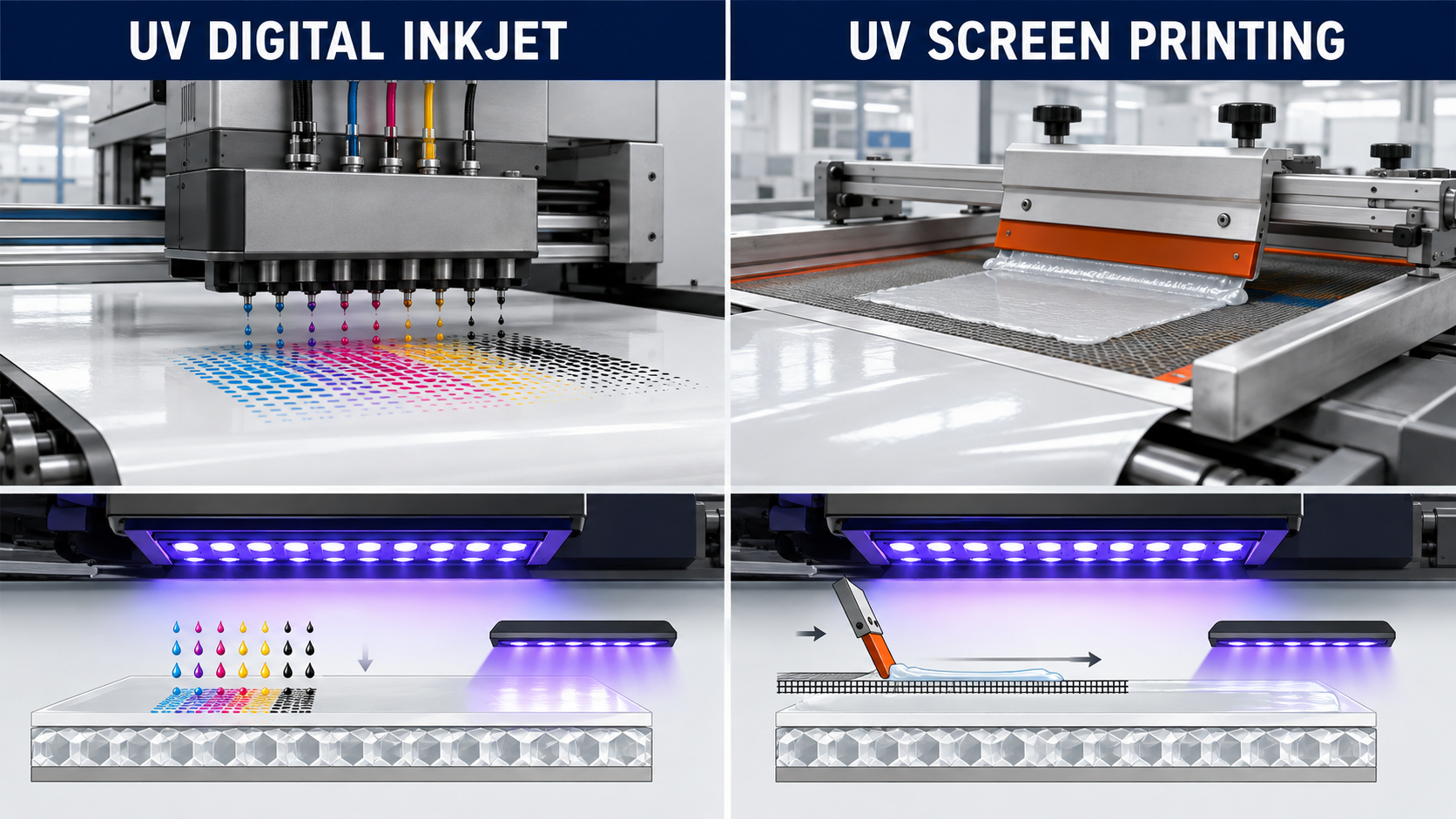
UV digital inkjet printing deposits small ink droplets through printheads and cures them with UV or UV-LED lamps. It is commonly used for:
Full-color graphics
Gradients
Photographic images
Variable data
Short production runs
Customized signage
UV screen printing transfers a formulated ink through a mesh screen and then cures it with UV energy. It is commonly used for:
Spot colors
Repeated traffic sign designs
License plate backgrounds
High-volume production
Durable industrial graphics
The ink chemistry, ink deposit and approved applications may be completely different.
If a technical data sheet says “UV screen printable,” it does not necessarily approve the reflective sheeting for UV digital inkjet printing.
Some license-plate reflective sheetings, for example, are specified for UV screen printing, solvent screen printing, roller coating or digital thermal transfer. This does not mean they can be printed with any UV flatbed or roll-to-roll inkjet printer.
Always ask the supplier to state the exact printing process—not just the word “UV.”
UV Printing Compatibility by Reflective Sheeting Material
Acrylic/PMMA Reflective Sheeting: Usually the Best Starting Point
Printable acrylic reflective sheeting is generally the strongest candidate for UV digital printing within a glass-bead reflective product range.
It offers:
A smooth printing surface
Relatively rigid handling
Good dimensional stability
Strong weather resistance
Good compatibility with flat printing equipment
Suitability for cutting, punching and stamping
Typical applications include:
Flat advertising and safety signs
Door and property plates
E-bike identification plates
Equipment identification plates
Reflective labels
Serial-number graphics
Small-batch customized signs
However, the word “acrylic” alone is not a UV printing approval.
A specific UV-printable grade should still be selected. The printer, ink family, curing parameters and actual production lot must be tested before bulk production.
Acrylic reflective sheeting is also less conformable than PVC. It may tear or crack when forced around tight curves or complex vehicle surfaces.
For a closer comparison of rigidity, tear behavior and printing methods, see PET vs PVC vs Acrylic Reflective Sheeting.
PVC Reflective Vinyl: Printable, but Flexibility Changes the Test
PVC reflective vinyl is widely selected for commercial graphics because it is flexible and works well with solvent and eco-solvent inks.
Direct UV printing is possible only when:
The product has a UV-compatible top surface
The UV ink is suitable for flexible media
The curing energy does not damage the film
The finished graphic passes bending and application tests
Use extra caution when the printed graphic will be:
Rolled tightly after printing
Applied to a curved surface
Bent around an edge
Installed on a moving or vibrating surface
Used on vehicle graphics
Exposed to repeated temperature changes
A print may pass a flat tape test and still crack during installation.
For PVC reflective vinyl, the qualification process should therefore include a bend or mandrel-style test that represents the actual application radius.
For flexible or curved advertising graphics, eco-solvent printing is often the more forgiving production route unless the PVC grade and flexible UV ink have already been qualified together.
Learn more about Ablaze PVC reflective vinyl for printing and signage.
PET Reflective Sheeting: Do Not Assume a Smooth Surface Is Printable
Standard PET reflective sheeting is:
Strong
Dimensionally stable
Relatively rigid
Resistant to tearing
Suitable for plotter cutting
Suitable for flat sign applications
However, its smooth appearance can be misleading.
Untreated PET may not provide sufficient surface wetting or chemical bonding for a particular UV ink.
Possible UV printing problems include:
Ink retracting into small islands
Pinholes in solid colors
Acceptable appearance but poor tape-test results
Edges lifting after cutting
Delayed peeling after 24 to 72 hours
Brittle failure after repeated flexing
Ink separating when adhesive tape is removed
Use PET for UV digital inkjet only when the supplier identifies the exact product as UV printable or provides a compatible treated or acrylic-coated version.
A primer or surface treatment may improve adhesion, but that treatment becomes part of the production system. It must also be tested for:
Optical clarity
Color reproduction
Surface uniformity
Weather resistance
Retroreflective performance
Compatibility with the UV ink
Standard PET reflective sheeting that has been designed mainly for plotter cutting should not automatically be marketed as UV printable.
Engineering PET products intended mainly for rigid aluminum sign panels should also be treated as product-specific.
“Engineering grade” describes a performance category. It does not guarantee digital printing compatibility.
PET With an Acrylic Coating: Better Potential, Still Grade-Specific
An acrylic-coated PET face can offer the dimensional stability of PET with a more print-compatible outer layer.
This construction is often a better UV printing candidate than untreated commercial PET.
Before ordering bulk material, confirm:
Which layer is exposed to the ink
Whether UV digital inkjet has been tested
Whether only UV screen printing has been tested
The recommended UV ink type
The recommended curing range
Whether a primer is required
Whether the durability claim includes the printed image
Whether the material is restricted to flat applications
The coating formulation matters more than the generic description “PET + acrylic.”
Two PET and acrylic composite products may use different coating formulas and deliver very different printing results.
Engineering-Grade Glass-Bead Reflective Sheeting
Engineering-grade glass-bead reflective sheeting is commonly used for:
Municipal road signs
Parking signs
Construction warning signs
Industrial safety signs
Flat aluminum sign panels
Delineation and boundary marking
Some engineering-grade products are designed for plotter cutting or screen printing rather than UV digital printing.
Before printing, confirm whether the exact engineering-grade product has:
A digital-printable top layer
An approved UV ink system
A required protective overlay
A printed-image durability statement
Compliance with the intended project specification
The reflective coefficient of the unprinted material does not automatically represent the performance of the completed printed sign.
HIP and High-Performance Microprismatic Sheeting: Use a Matched System
Microprismatic traffic-sign sheeting can be digitally UV printed, but regulated signs should not be produced by combining unapproved components simply because the ink appears to stick.
The printing system can affect:
Retroreflectivity
Daytime color
Nighttime color
Contrast
Legibility
Weathering performance
Warranty coverage
Compliance with the project specification
Major manufacturers qualify complete systems.
3M specifies UV-curable inks for selected prismatic sheetings, while Avery Dennison’s TrafficJet warranty identifies approved sheeting, ink and overlay combinations.
The lesson is broader than either brand: for specification-controlled traffic signs, validate the entire system rather than only the base film.
The complete system may include:
Reflective sheeting
UV ink
Printer
Color profile
Printing resolution
Ink limit
Curing parameters
Clear overlay film
Aluminum substrate
Application process
License-Plate Reflective Sheeting
License-plate reflective sheeting is a specialized material system.
Depending on the country and production method, it may need to support:
Embossing
Hot stamping
Roller coating
Screen printing
Thermal transfer
Security marks
Protective overlays
Specific color and retroreflection requirements
A statement that license-plate sheeting is compatible with “UV printing” must be clarified.
The approval may refer to UV screen printing rather than generic UV digital inkjet.
Always follow the specified plate production system and applicable national standard.
How Does UV Printing Affect Retroreflectivity?
Retroreflective sheeting returns incoming light toward its source.
Printed ink sits in the light path, so it can absorb, scatter or block part of the incoming and returning light.
The effect depends on:
Ink transparency
Pigment type
Printed color
Total ink coverage
Number of ink layers
Use of white ink
Surface texture
Gloss level
Clear ink or varnish
Protective overlay
Transparent traffic colors are used in qualified sign systems because they allow more light to enter and return through the reflective layer.
Dense process colors, opaque spot colors and especially white ink can sharply reduce reflection in the printed area.
This is not necessarily a defect for an advertising graphic. However, it can be unacceptable for a regulated traffic sign.
How Different Ink Coverage Affects Reflection
Printed construction | Expected effect on retroreflection |
|---|---|
Light transparent color | Lower reduction in reflection |
Transparent traffic color | Designed to preserve controlled retroreflection when used in an approved system |
Dense CMYK color | Greater absorption and lower nighttime brightness |
Multiple heavy ink layers | Increased light blocking |
Opaque spot color | Strong reduction in the printed area |
White ink | Can block most of the reflection beneath the printed area |
Clear varnish | May change gloss and light transmission; requires testing |
Incompatible laminate | May change optical performance or cause silvering |
Evaluate the completed printed construction at night under a headlamp or controlled light source.
When a project specifies a minimum coefficient of retroreflection or chromaticity requirement, test the printed sign with the applicable instrument and measurement geometry—not only the unprinted reflective roll.
Step-by-Step UV Printing Workflow for Reflective Sheeting
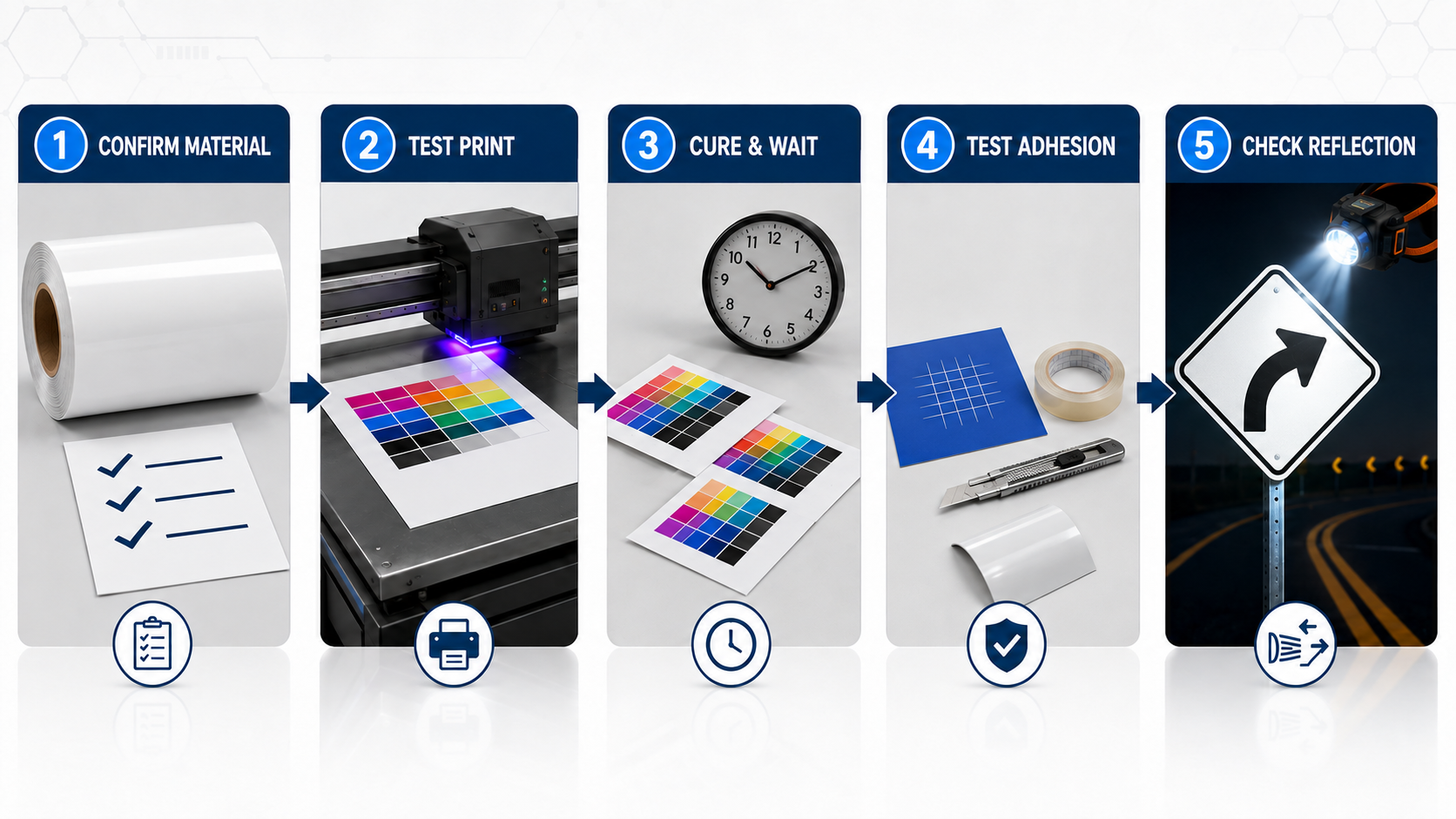
Step 1: Define the Final Application
Record whether the finished product is intended for:
Indoor advertising
Temporary outdoor signage
Vehicle graphics
Construction signs
Permanent traffic signs
Equipment identification
License plates
Also confirm:
Required outdoor service life
Flat or curved application
Expected bending during installation
Exposure to cleaning chemicals
Exposure to water and sunlight
Required regulation or project standard
A material suitable for a flat advertising board may not be suitable for a regulated traffic sign or curved vehicle graphic.
Step 2: Confirm the Exact Sheeting Construction
Ask the supplier for the product code and technical data sheet.
Confirm:
Glass-bead or microprismatic technology
Exposed face material
Printable top coating
UV digital inkjet compatibility
Approved printer and ink, if specified
Flat, curved or flexible application limits
Laminate or overlay requirement
Printed-image warranty
Recommended storage conditions
Do not qualify material from a generic sample labeled only “PET,” “PVC” or “acrylic.”
Step 3: Condition and Clean the Media
Allow the roll and printing room to reach the printer manufacturer’s recommended temperature and humidity.
Keep the printing surface dry and handle it with clean gloves.
Remove loose dust using a lint-free method approved by the reflective sheeting supplier.
If cleaning is permitted:
Use only the recommended cleaner
Avoid leaving lint or residue
Allow the cleaner to evaporate completely
Do not print on a damp surface
Strong solvents may haze, soften or damage the weather layer.
Never sand or aggressively abrade a reflective surface unless the manufacturer has explicitly approved that treatment. Abrasion can damage the protective layer and affect retroreflectivity.
Step 4: Build a Small Print-Test Matrix
Use the actual production printer and ink.
Print a test file containing:
100% cyan
100% magenta
100% yellow
100% black
Composite dark colors
Light tints
Gradients
Fine text
Sharp edges
White ink, if required
Clear ink or varnish, if required
Compare a small range of manufacturer-permitted settings, such as:
Normal ink limit
Reduced ink limit
Normal curing level
A permitted lower or higher curing level
Different pass modes
Avoid changing many variables at once. Otherwise, it will be difficult to identify which change improved or reduced adhesion.
Step 5: Allow a Controlled Dwell Period
Label every sample with:
Reflective sheeting product code
Batch or lot number
Printer model
Ink series
Printing profile
Pass mode
UV lamp setting
Printing date
Operator
Test once after the normal production dwell time.
For a new material and ink combination, repeat the test after:
24 hours
72 hours
Step 6: Test More Than Surface Dryness
A glossy, dry image is not proof of reliable adhesion.
Complete the following tests where applicable:
Visual wetting inspection
Scratch test
Cross-cut tape test
Bend and flex test
Cutting and edge-pick test
Water resistance test
Cleaning resistance test
Retroreflectivity test
Step 7: Validate the Finished Construction
If the job will be cut, laminated, mounted, bent, washed or installed outdoors, test it in that final form.
Cutting can expose weak edges.
Lamination adds mechanical stress.
Mounting can reveal cracking.
Outdoor heat and moisture can accelerate failure.
The sample should represent the completed product as closely as possible.
How to Test UV Ink Adhesion on Reflective Film
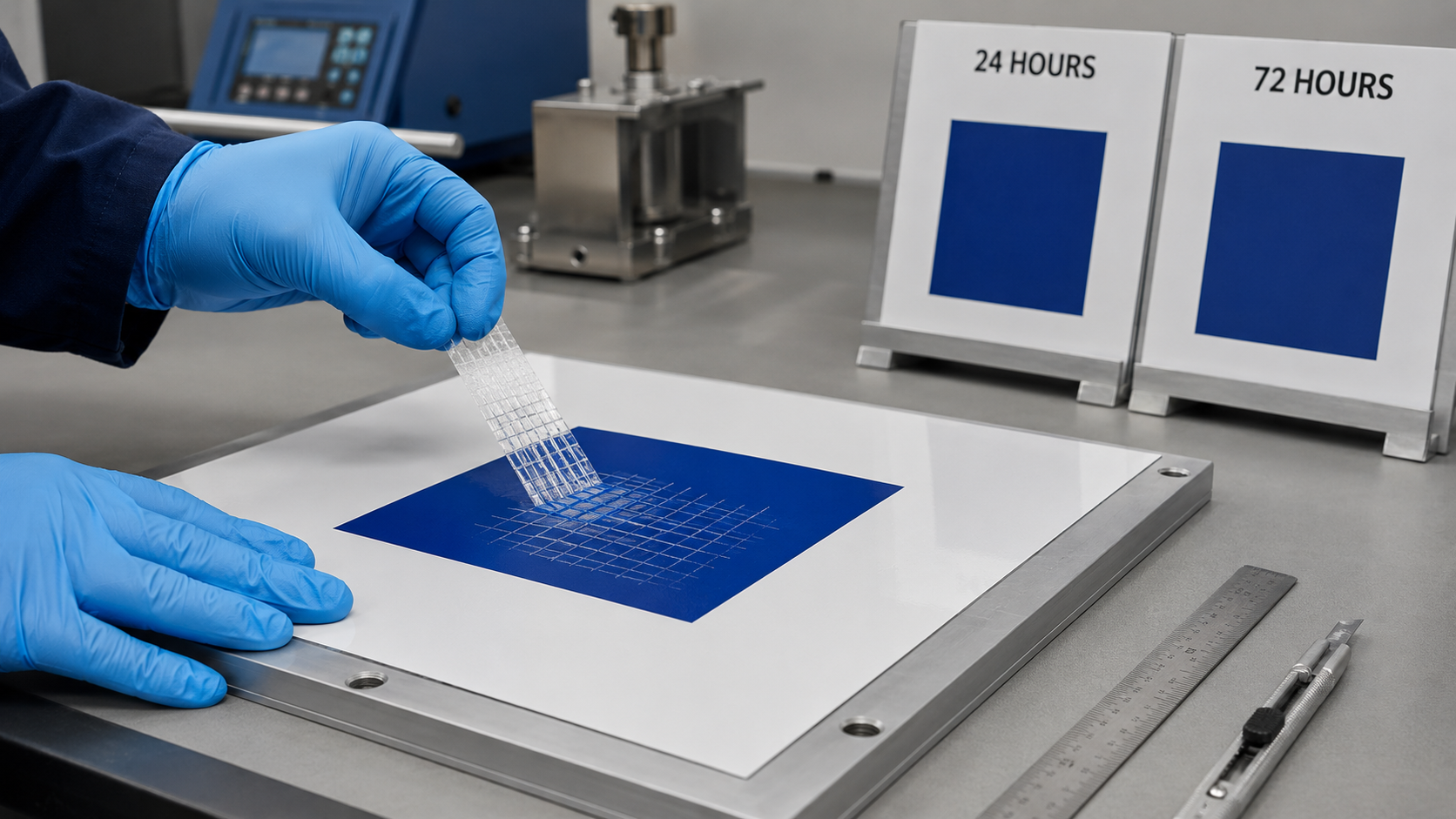
1. Visual Wetting Check
Inspect solid printed colors for:
Pinholes
Fisheyes
Ink retraction
Mottling
Uneven gloss
Unprinted spots
Irregular edges
Poor wetting at this stage usually indicates surface contamination or an incompatible surface.
2. Fingernail or Controlled Scratch Check
Lightly check whether the ink can be removed from a solid printed area.
Use the same method and pressure when comparing samples.
This is a quick production screening method, not a complete durability test.
3. Cross-Cut Tape Test
For formal internal evaluation, use an appropriate recognized method such as ASTM D3359 or ISO 2409.
The test should use the correct:
Cutting tool
Grid spacing
Tape
Tape pressure
Dwell time
Removal angle
Evaluation method
These methods assess resistance to separation. They are not universal quantitative measurements of bond strength.
Plastic and flexible substrates also require careful interpretation.
Record the test method, tape type, waiting period and result so different batches can be compared consistently.
4. Bend and Flex Test
This test is required for PVC and any printed material that will be rolled, bent or applied to a curve.
Bend the printed sample to the smallest radius expected during production and installation.
Look for:
Whitening
Hairline cracks
Edge lifting
Ink flaking
Separation between ink layers
A print that performs well on a flat table may fail when wrapped around an edge.
5. Cutting and Edge-Pick Test
Contour-cut the actual design or a representative grid.
Weed the material and handle the cut edges.
Check whether the ink:
Chips away from the cut line
Lifts with the waste material
Separates during weeding
Cracks around small letters
Peels when an edge is picked
6. Water and Cleaning Resistance Check
After the ink has fully cured, expose a sample to the moisture and cleaning conditions expected during actual use.
Check for:
Ink softening
Color transfer
Blistering
Loss of adhesion
Surface haze
Delamination
Do not create a chemical test that is much harsher than the intended application unless the project specification requires it.
7. Nighttime Reflection Check
Compare printed and unprinted sections under retroreflective viewing conditions.
For a general commercial sign, a controlled headlamp comparison may be useful for internal evaluation.
For regulated traffic or safety applications, use the specified retroreflectometer and color measurement method rather than relying on a phone photograph.
Recommended Minimum Qualification Record
Test item | Immediate | 24 hours | 72 hours | After finishing/application |
|---|---|---|---|---|
Visual wetting | Yes | — | — | Yes |
Scratch resistance | Yes | Yes | Yes | Yes |
Cross-cut/tape test | Optional | Yes | Yes | If required |
Bend/flex test | — | Yes | Yes | Yes for flexible jobs |
Cut-edge test | — | Yes | Yes | Yes |
Water/cleaning check | — | — | Yes | As required |
Retroreflectivity/color | Baseline | — | — | Yes for safety specifications |
Common UV Printing Problems and How to Fix Them
Problem | Likely cause | Corrective action |
|---|---|---|
Ink beads up or forms pinholes | Contamination, moisture or poor surface wetting | Stop production, verify the cleaning method and test a confirmed printable grade |
Ink scratches off immediately | Incompatible surface, undercuring or excessive ink deposit | Check ink and media approval, reduce the deposit if appropriate and adjust curing only within the printer manufacturer’s range |
Print passes initially but peels later | Weak chemical bond, additive migration or insufficient qualification time | Repeat the 24- and 72-hour tests; change the media, ink or approved pretreatment |
Ink cracks when the film bends | Ink too hard, excessive cure or ink layer too thick | Use flexible ink, reduce unnecessary layers or choose a more suitable printing process |
Media curls, waves or distorts | Excessive heat, lamp energy or tension | Reduce permitted heat or energy, improve media handling or use a dimensionally stable grade |
Dark areas lose most of their reflection | Opaque or high-density ink, multiple layers or white ink | Use suitable transparent colors, reduce coverage or design unprinted reflective zones |
Adhesion fails near cut edges | Brittle ink film or weak surface bond | Allow proper dwell time, optimize contour cutting and qualify the complete print-and-cut workflow |
Laminate lifts or shows silvering | Incompatible overlay, trapped air or premature finishing | Use an approved clear film and follow its pressure, temperature and dwell requirements |
Different rolls print differently | Lot variation, storage history or surface contamination | Record lot numbers, use incoming quality control and approve a retained production sample |
Should You Use a Primer or Adhesion Promoter?
A compatible primer can improve wetting and bonding on difficult surfaces, but it is not a universal repair for unsuitable reflective sheeting.
A primer may also:
Change the gloss
Change optical clarity
Affect printed color
Reduce or alter retroreflection
Create visible coating marks
Introduce another weathering failure point
Void the sheeting or printer warranty
Use a primer only when it is approved for the ink, reflective sheeting and final application.
Apply it consistently and include the primed construction in every adhesion, weathering and retroreflectivity test.
For repeat production, purchasing a purpose-made UV-printable reflective grade is usually more controllable than manually priming a non-printable film.
Does UV-Printed Reflective Sheeting Need Lamination?
Not always.
Lamination depends on the ink system, application and durability requirement—not simply on whether the ink is UV cured.
A protective overlay may be required for:
Long-term process-color traffic signs
Anti-graffiti performance
Anti-dew performance
Vehicle graphics exposed to washing and abrasion
Chemical exposure
Frequent cleaning
Manufacturer-backed system warranties
For example, the Avery Dennison TrafficJet system requires specified overlays for certain process-color traffic-sign and vehicle configurations, while some temporary black work-zone sign configurations do not require one.
This demonstrates why “UV ink does not need lamination” is too broad a rule.
If a laminate is used, verify that it is:
Optically suitable for reflective sheeting
Compatible with the cured ink
Suitable for the expected outdoor life
Appropriate for the required application surface
Test the complete stack for adhesion, color and retroreflectivity.
UV Printing vs Eco-Solvent vs Screen Printing: Which Should You Choose?
Production need | Usually preferred process | Why |
|---|---|---|
Full-color short runs on flat acrylic reflective sheeting | UV digital inkjet | Fast curing, sharp variable graphics and efficient short-run production |
Flexible commercial reflective graphics | Eco-solvent on compatible printable PVC | Often provides better flexibility and a well-established vinyl printing workflow |
Large quantities of spot-color signs | Screen printing with approved ink | Durable color deposit and efficient repeat production |
Specification-controlled digital traffic signs | Qualified digital traffic-sign system | Controls sheeting, ink, color, overlay, durability and warranty as one system |
Plotter-cut letters and symbols on standard PET | Plotter cutting rather than direct printing | Avoids relying on a surface that was not designed for inkjet adhesion |
License plates | Approved license-plate production system | Security, embossing, color, retroreflection and durability requirements are system-specific |
Buyer Checklist: What to Ask Before Purchasing UV-Printable Reflective Sheeting
Send the reflective sheeting supplier these questions before approving a bulk order:
Is this exact product code approved for UV digital inkjet, not only UV screen printing?
What is the exposed face material or printable coating?
Which printer and ink families have been tested?
Is hard or flexible UV ink recommended?
Is a primer, corona treatment or other pretreatment required?
Is the product limited to flat surfaces?
What post-print adhesion test does the supplier use?
How long does the supplier wait before testing adhesion?
Does the durability statement cover only the unprinted sheeting or the complete printed image?
Is a laminate or protective overlay required?
Can the supplier provide samples from the same construction as the planned bulk order?
Will the printed product meet the required ASTM, EN, national or project-specific traffic-sign standard?
Can the supplier support batch records and consistent repeat orders?
Are OEM packaging, custom labels and roll-size customization available?
When requesting a recommendation, provide:
Printer model
UV ink series
Application
Flat or curved surface
Indoor or outdoor use
Expected service life
Required roll size
Required color
Order quantity
Destination climate
Required regulation or standard
This information helps the supplier recommend the correct material instead of simply quoting the cheapest reflective roll.
Frequently Asked Questions
Can Any UV Printer Print on Reflective Vinyl?
No. A UV printer may physically deposit ink on many materials, but reliable adhesion depends on the reflective film’s top surface, ink chemistry, curing conditions and end-use stress.
Test the exact printer, ink and reflective sheeting combination before production.
What Is the Best Reflective Sheeting for UV Printing?
For general flat commercial applications, purpose-made UV-printable acrylic/PMMA glass-bead reflective sheeting is usually the safest starting point.
For flexible graphics, use a confirmed UV-printable PVC grade with flexible UV ink or consider eco-solvent printing.
Traffic-grade microprismatic sheeting should use a qualified printing system.
Can Standard PET Reflective Sheeting Be UV Printed?
Do not assume so.
Standard PET reflective sheeting may have weak surface wetting or UV ink adhesion.
Use a UV-printable treated or coated PET grade and perform immediate, 24-hour and 72-hour adhesion tests before production.
Can UV Ink Reduce Reflectivity?
Yes.
Ink absorbs or blocks part of the incoming and returning light.
Transparent colors usually preserve more retroreflection than dense opaque colors. White ink can substantially block reflection in the printed area.
Test the completed printed graphic when nighttime visibility is important.
Why Does UV Ink Peel Off Reflective Film?
Common causes include:
Incompatible surface
Surface contamination
Insufficient wetting
Incorrect ink type
Undercuring
Excessive ink thickness
Stress from bending
Stress from cutting
Additive migration from the film
Increasing UV lamp power alone may make the print brittle without improving the underlying chemical bond.
How Long Should I Wait Before Testing UV Ink Adhesion?
Perform an immediate production check, then retest a new material and ink combination after 24 and 72 hours.
The final release time should follow the ink and printer manufacturer’s instructions.
Is a Cross-Hatch Tape Test Enough?
No.
It is useful for comparing adhesion, but the finished product may also experience:
Bending
Cutting
Rolling
Water exposure
Cleaning
Lamination
Outdoor weathering
Build the test plan around the real application.
Does UV-Printed Reflective Sheeting Need a Clear Laminate?
It depends.
Short-term commercial signs may not require lamination. Process-color traffic signs, vehicle graphics, anti-graffiti applications or warranty-controlled systems may require a specific protective overlay.
Confirm the complete construction with the material supplier.
Can I Use an Adhesion Promoter on Reflective Sheeting?
Only if it is approved and tested for the specific surface.
A primer can improve adhesion but may change:
Optical clarity
Color
Gloss
Retroreflectivity
Outdoor weathering
Warranty coverage
Is UV Screen Printing the Same as UV Digital Printing?
No.
UV screen printing and UV digital inkjet use different ink formulations and ink deposition methods.
Approval for UV screen printing does not automatically mean a material is compatible with UV digital inkjet printing.
Final Recommendation
You can UV print on reflective sheeting, but the word “reflective” does not define printability.
Select the material according to its exact surface construction and final application:
Choose UV-printable acrylic reflective sheeting for many flat customized signs and identification products.
Use PVC only after confirming its printable coating and testing ink flexibility.
Avoid standard untreated PET for UV inkjet unless the supplier has approved the exact grade.
Treat HIP, high-performance microprismatic and license-plate films as complete system applications.
Before bulk production:
Print the actual artwork.
Allow the defined dwell period.
Run scratch and tape tests.
Test bending and cutting where applicable.
Evaluate the completed laminated or mounted construction.
Check nighttime reflection.
Confirm any required traffic-sign or safety standard.
This qualification process costs far less than replacing a batch of peeling, cracking or noncompliant signs.
Request a UV Printing Compatibility Sample
Ablaze supplies glass-bead and microprismatic reflective materials for commercial signage, safety identification and traffic applications.
To recommend a suitable product, send us:
Printer model and UV ink series
Required material: PVC, PET, acrylic or microprismatic
Final application and surface shape
Indoor or outdoor service-life target
Roll size, color and order quantity
Required standard or certification
We can help you compare material constructions and arrange sample testing before bulk ordering.
You can also review our complete guide to printable reflective sheeting or explore advertising-grade reflective sheeting for PVC, PET and acrylic options.
RELATED NEWS

UV Printing on Reflective Sheeting: Adhesion Guide
Can You UV Print on Reflective Sheeting? Ink Adhesion Guide by MaterialYes, UV printing can work on reflective sheeting—but only when the sheeting surface, UV ink and curing settings are compatible.A product described simply as “reflective vinyl” is not automatically UV printable. Printable acrylic

Top 15 Reflective Sheeting Manufacturers & Suppliers Serving Indonesia in 2026
This guide reviews 15 leading reflective sheeting manufacturers and suppliers serving Indonesia in 2026, including global brands and established Asian manufacturers. It compares their product focus, reflective technologies, and suitability for different buyers, while also explaining Engineering Grade, HIP, and high-performance microprismatic sheeting. The article also provides practical guidance for Indonesian importers on supplier selection, technical performance, OEM options, sample testing, and total sourcing cost.